Face Bouquet
A bouquet wrapped in brown kraft paper with a white bow, each flower replaced by faces with different smiles and angles, set against a soft pink background.
Create your version
Choose a type, then add a photo for each role.
1 photo · Human
1 photo : you, chest up, face clear
This type is not ready yet. Try another type or template.
Face Bouquet
Photo template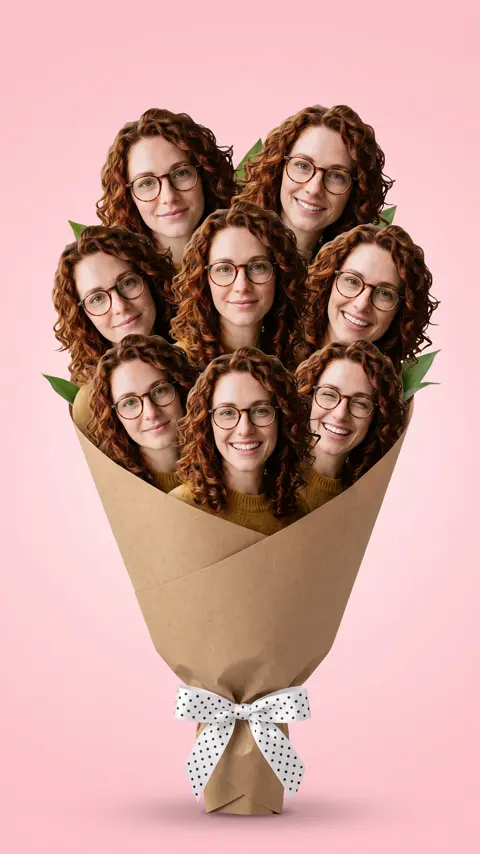
Face Bouquet
- Templates
- Face Bouquet
- Photos
- 1–3
This comparison applies only to the example template shown above. Available versions, durations, resolutions and credit costs vary by template. The creation panel shows the exact quote for your selection before generation.
Choosing your photos
Upload clear, chest-up selfies for each role. For 3 selfies, use three distinct looks. For couple, provide one chest-up photo each of you and your partner, friend, or pet.
Human · 1 photo
- you, chest up, face clear
3 selfies · 3 photos
- you, photo 1
- you, photo 2 (another look)
- you, photo 3 (another look)
Couple · 2 photos
- you, chest up
- your partner, friend or pet, chest up
Pet · 1 photo
- your pet, face clear
Before you create
Each type has its own photo requirements. Settings and cost follow your current selection and quote. Your generated result may differ from the reference.
How it works
- 1
Pick a trend
Choose a template and preview the effect. Select a creation type to see its photo requirements.
- 2
Upload your photos
Upload one clear subject per requested photo. Follow the role labels for people, pets and multiple subjects.
- 3
Render and share
Review the price, start creating and find your result in My works. Preview and download it when ready.
- Credits returned if generation fails
- No subscription · purchased credits do not expire
- Secure checkout with Stripe
Explore more templates
View all
FAQ
How are the faces arranged in the bouquet?
Each flower in the bouquet is replaced by a different face, showing various smiles and angles for a lively effect.
What kind of photos should I upload for the couple or pet option?
For couple or pet, upload one clear, chest-up photo of yourself and one of your partner, friend, or pet, both with visible faces.
Find your next trend
Every template in one studio. See the price before you render.
Make a trend video