 The Virumi team
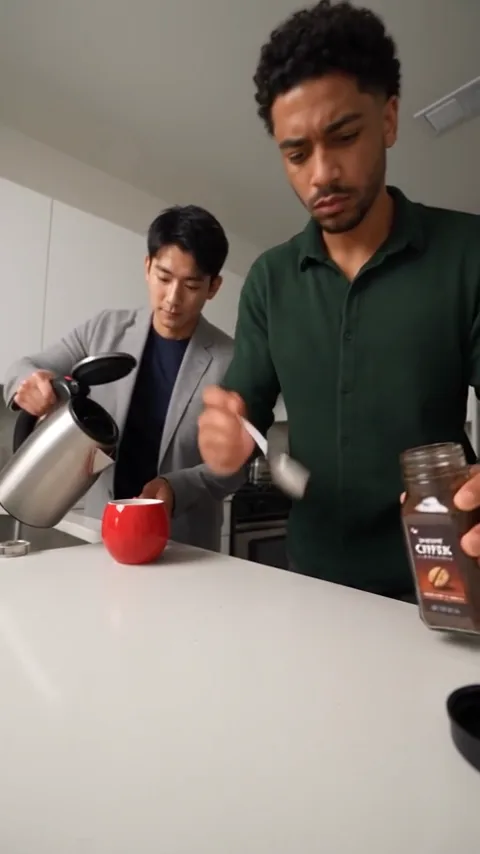
The deadpan kitchen gag deliberately makes coffee the wrong way: powder goes on the counter, water goes into the cup and milk spills over the worktop before the closing reaction. The matching soundtrack is Julio Iglesias’s “Con la Misma Piedra”. The earliest social-media publisher of this AI scene has not been confirmed.
Photos and roles
Choose people, dogs or cats first. Photo one is the foreground coffee maker on the right; the optional second photo supplies the pouring partner behind on the left. One photo is enough for an AI partner.
Use a clear original with visible face or muzzle, ears and enough body outline. Keep one subject per slot and avoid group shots, obstructions, stickers and dark screenshots. Compare the good/bad examples in the upload area.
Resolutions and prices
Standard: 480p 15 credits, 720p 25 credits. Premium: 480p 30 credits, 720p 60 credits, 1080p 105 credits.
An eligible account’s first Premium full video at 480p costs 20 credits, once across the account; this 480p offer does not apply to 720p/1080p.
One-off purchase without registration: Standard 480p $7.99 or 720p $11.99; Premium 480p $9.99 or 720p $19.99. 1080p uses credits and has no one-off cash offer. Check the selected scene, model, resolution and confirmation quote before buying.
Create the video
- Open Coffee Fail and select the subject or cut.
- Upload photos in labeled role order. A second slot is optional; no separate input-mode switch is needed.
- Select Standard or Premium and a resolution, then check the duration and current quote.
- Review the whole result for identity, motion, cuts and music timing, then download the version with sound.
What the sample establishes
Existing examples keep their actual source and resolution labels. Selecting 720p or 1080p does not turn a 480p sample into a new high-resolution test.
Fine spoon/liquid contact can vary. The existing Standard dog example adds a spoon and the Standard cat opening also uses the jar. Pet paws remain stylized; the samples do not establish exact frame-level reproduction.