 The Virumi team
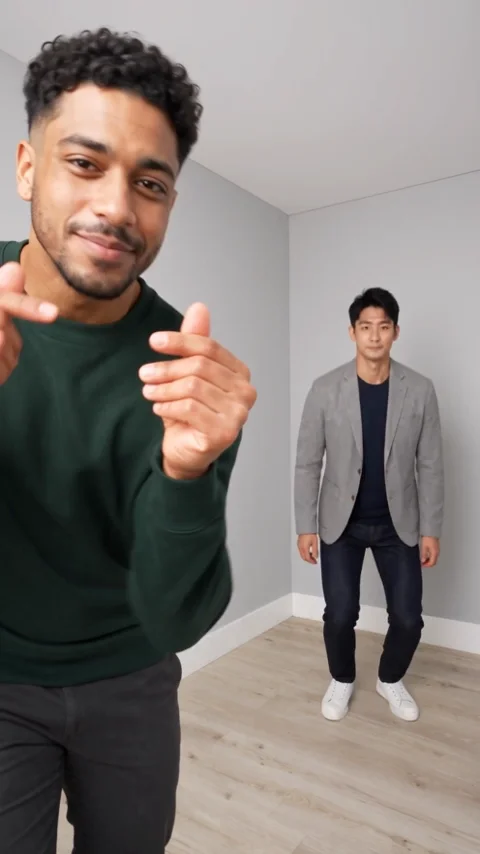
The perspective gag uses hops, a hand gesture and a hard cut between two front/back arrangements. Readable identities and body scale matter more than a single attractive opening frame. The template includes the Hop Hop Hop sound effect.
Photos and roles
Photo one starts in front; the optional second person starts behind. They swap foreground/background roles around the middle cut. If only the first photo is present, AI supplies a different partner.
Use a clear original with visible face or muzzle, ears and enough body outline. Keep one subject per slot and avoid group shots, obstructions, stickers and dark screenshots. Compare the good/bad examples in the upload area.
Resolutions and prices
Standard: 480p 10 credits, 720p 20 credits. Premium: 480p 20 credits, 720p 40 credits, 1080p 70 credits.
Hop Premium 480p already has a 20-credit regular rate.
One-off purchase without registration: Standard 480p $7.99 or 720p $11.99; Premium 480p $9.99 or 720p $19.99. 1080p uses credits and has no one-off cash offer. Check the selected scene, model, resolution and confirmation quote before buying.
Create the video
- Open Hop Hop Hop and select the subject or cut.
- Upload photos in labeled role order. A second slot is optional; no separate input-mode switch is needed.
- Select Standard or Premium and a resolution, then check the duration and current quote.
- Review the whole result for identity, motion, cuts and music timing, then download the version with sound.
What the sample establishes
Existing examples keep their actual source and resolution labels. Selecting 720p or 1080p does not turn a 480p sample into a new high-resolution test.
The existing 480p examples exaggerate the crouch into a deeper fall. One single-photo sample also adds an unrequested shoulder bag. Motion timing and clothing can vary.